Running my personal tech blog on a Talos homelab with Argo CD
A practical walkthrough of running a self-hosted Ghost blog on a single-node Talos Kubernetes homelab using Argo CD GitOps, Traefik ingress, and Longhorn storage.

Intro – Who I am and why this setup
I'm an SRE /sysadmin / devops / automation engineer (the last is the one that I like the most), and this blog is my place to document what I'm building in my homelab (which sometimes translate to my work over the enterprise environments and sometimes it doesnt) so I can come back later and see exactly how and why I put things together.
As a big "everything as code" fan, I try to keep things always-on, reproducible, and reliable, following a GitOps-style approach as much as possible.
Why self-hosted and why Ghost
There are plenty of easy options to start a blog (GitHub Pages, Hashnode, Medium, etc.), but I wanted this to be dogfooding for my day-to-day work:
- I want everything to be declarative and reproducible.
- I want to keep infra and config in Git, not in random UIs.
- I want to have one more “real” workload running in my homelab Kubernetes cluster.
Ghost is a nice fit for that: it’s simple, focused on blogging, and there is already a maintained Helm chart I can consume instead of reinventing the wheel. On top of that, running Ghost like “just another app” behind Traefik and managed by Argo CD is a good template for the rest of the services I plan to host in this cluster.
High-level architecture
At a very high level this blog is “just another app” running inside my homelab Kubernetes cluster.
I’m using a single-node Talos cluster on a Beelink mini-PC. On top of that I run:
- Traefik as the ingress controller, exposing HTTP/HTTPS from my home network to the cluster.
- Argo CD as the GitOps engine, syncing manifests from Git into Kubernetes.
- Ghost + MySQL as a regular Helm release.
- Longhorn to provide persistent volumes for both Ghost content and the database.
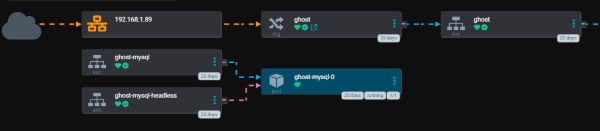
From the outside, the flow looks like this:
- Browser → home router → Traefik → Ghost (pod) → MySQL → Longhorn volumes.
- Git → Argo CD → Kubernetes → (re)deploy Ghost when I change config.
Talos and the Kubernetes baseline
The cluster is a single-node Talos installation running on a Beelink SER5 mini-PC. Talos is interesting for a homelab because:
- The OS is immutable and managed entirely through a YAML config.
- Kubernetes is built-in – no extra kubeadm / kube-spray steps.
- It fits very well with a GitOps mindset: I can version the Talos machine config in Git the same way I do with my apps.
On top of Talos I only install a small set of “base” components:
- MetalLB for bare-metal
LoadBalancerservices. - Traefik as the ingress controller.
- Longhorn for persistent storage.
- Argo CD as the GitOps controller.
Ghost is not special in any way here – it’s just another Helm release that runs on top of this baseline.
Traefik, DNS and TLS
Traffic from the outside world lands on my home router and then on a MetalLB IP that points to Traefik. From there, Traefik routes requests based on the hostname:
blog.example.com→ Ghostargocd.example.com→ Argo CD- etc.
DNS is just pointing those hostnames to my public IP (or directly to my home IP when I’m on VPN).
Git repo and Argo CD application
Everything lives in a Git repository that Argo CD watches continuously. The structure is roughly:
ghost-blog/
  apps/
    app-ghost-helm.yaml      # Argo CD Application for the Helm release
  helm-values/
    ghost/
      values.yaml            # Custom values for the Ghost chart
  kustomization.yaml         # Optional, if I group things with Kustomize
Git repository & YAML layout
ghost-talos-laughingmanlab-net/
apps/
app-ghost-config.yaml # Argo CD app: namespace + config (secrets, etc.)
app-ghost-helm.yaml # Argo CD app: Helm release for Ghost
helm-values/
ghost/
Chart.yaml # Wrapper chart for Bitnami Ghost
values.yaml # Custom values for Ghost + MySQL
manifests/
ghost/
ns.yaml # Namespace
ghost-secrets*.yaml # Secret / SealedSecret objects (not shown here)
ghost-mysql-.yaml # MySQL auth secrets (not shown)
ghost-smtp-.yaml # SMTP secrets (not shown)
Below are the core YAMLs I actually keep in Git. I’m skipping the Secret / SealedSecret bodies on purpose.
Git repository & YAML layout
In my case all of this lives in a small Git repo, for example:
https://gitlab.com/YOUR_NAMESPACE/ghost-talos-laughingmanlab-net
The relevant files look like this:
ghost-talos-laughingmanlab-net/
  apps/
    app-ghost-config.yaml      # Argo CD app: namespace + base config
    app-ghost-helm.yaml        # Argo CD app: Helm release for Ghost
  helm-values/
    ghost/
      Chart.yaml               # Wrapper chart for Bitnami Ghost
      values.yaml              # Custom values for Ghost + MySQL
  manifests/
    ghost/
      ns.yaml                  # Namespace
      ghost-secrets*.yaml      # Secret / SealedSecret objects (not shown here)
      ghost-mysql-*.yaml       # MySQL auth secrets (not shown)
      ghost-smtp-*.yaml        # SMTP secrets (not shown)
Below are the core YAMLs I keep in Git. I’m skipping the Secret / SealedSecret bodies on purpose (and probably in the future I will move to eso with hashicorp vault).
Argo CD Applications
---
apiVersion: argoproj.io/v1alpha1
kind: Application
metadata:
  name: ghost-config
  namespace: argocd
spec:
  project: internal
  source:
    repoURL: https://gitlab.com/YOUR_NAMESPACE/ghost-talos-laughingmanlab-net.git
    targetRevision: HEAD
    path: manifests/ghost
  destination:
    server: https://kubernetes.default.svc
    namespace: ghost
  syncPolicy:
    automated:
      selfHeal: true
      prune: true
    syncOptions:
      - CreateNamespace=true
---
apiVersion: argoproj.io/v1alpha1
kind: Application
metadata:
  name: ghost-helm
  namespace: argocd
  annotations:
    argocd.argoproj.io/depends-on: ghost-config
spec:
  project: internal
  source:
    repoURL: https://gitlab.com/YOUR_NAMESPACE/ghost-talos-laughingmanlab-net.git
    targetRevision: HEAD
    path: helm-values/ghost
    helm:
      releaseName: ghost
  destination:
    server: https://kubernetes.default.svc
    namespace: ghost
  syncPolicy:
    automated:
      selfHeal: true
      prune: true
    syncOptions:
      - CreateNamespace=true
      - HelmDependencyUpdate=true
Namespace
---
apiVersion: v1
kind: Namespace
metadata:
  name: ghost
Wrapper chart (Helm)
helm-values/ghost/Chart.yaml:
---
apiVersion: v2
name: ghost-wrapper
description: Wrapper chart for Bitnami Ghost (GitOps friendly)
type: application
version: 0.1.0
appVersion: "6"

dependencies:
  - name: ghost
    alias: ghost
    version: ">=22.0.0 <23.0.0"
    repository: https://charts.bitnami.com/bitnami
Ghost + MySQL Helm values
helm-values/ghost/values.yaml:
---
global:
  security:
    allowInsecureImages: true

ghost:
  # Use an existing Secret for the Ghost admin password
  existingSecret:
    name: ghost-secrets
    keyMapping:
      ghost-password: ghost-password

  image:
    registry: docker.io
    repository: bitnamilegacy/ghost
    tag: 6.0.5

  # Admin user is created on first boot through the UI
  ghostEmail: "[email protected]"
  ghostUsername: "admin"

  ghostHost: "ghostblog.talos.laughingmanlab.net"
  allowEmptyPassword: false

  service:
    type: ClusterIP

  ingress:
    enabled: true
    ingressClassName: traefik
    hostname: ghostblog.talos.laughingmanlab.net
    tls: true
    annotations:
      kubernetes.io/ingress.class: "traefik"
      cert-manager.io/cluster-issuer: "step-issuer"
    extraTls:
      - hosts:
          - ghostblog.talos.laughingmanlab.net
        secretName: ghost-tls

  # Internal MySQL bundled with the chart
  mysql:
    enabled: true
    architecture: standalone

    image:
      registry: docker.io
      repository: bitnamilegacy/mysql
      tag: "8.4.3"

    auth:
      existingSecret: "mysql-auth"
      database: "ghost"
      username: "ghost"

    primary:
      resources:
        requests:
          cpu: "250m"
          memory: "512Mi"
      persistence:
        enabled: true
        size: 10Gi
        storageClass: longhorn

  # Ghost data
  persistence:
    enabled: true
    storageClass: longhorn
    size: 20Gi

  resources:
    requests:
      cpu: "250m"
      memory: "512Mi"

  ## SMTP (Ghost → admin emails / newsletters)
  extraEnvVars:
    - name: mail__transport
      value: "SMTP"
    - name: mail__options__host
      valueFrom:
        secretKeyRef:
          name: ghost-secrets
          key: smtp__host
    - name: mail__options__port
      valueFrom:
        secretKeyRef:
          name: ghost-secrets
          key: smtp__port
    - name: mail__options__auth__user
      valueFrom:
        secretKeyRef:
          name: ghost-secrets
          key: smtp__user
    - name: mail__options__auth__pass
      valueFrom:
        secretKeyRef:
          name: ghost-secrets
          key: smtp__pass
    - name: mail__options__secure
      valueFrom:
        secretKeyRef:
          name: ghost-secrets
          key: smtp__secure